
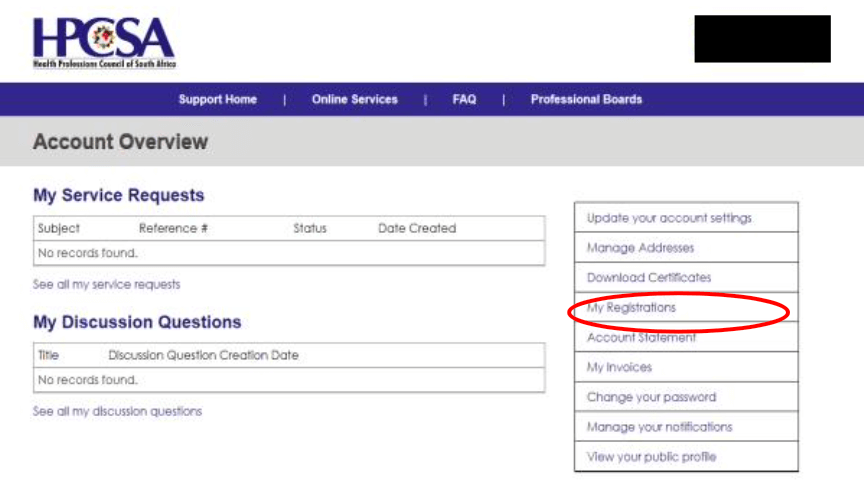
The Health Professions Council of South Africa (HPCSA) is the regulatory body responsible for overseeing healthcare professionals in South Africa. To simplify communication and administrative processes, the organization introduced the HPCSA Portal, an online platform where practitioners can manage their professional profiles, renew registrations, and access important services.
This guide explains what the HPCSA Portal is, its key features, how to register, log in, and resolve common issues.
What Is the HPCSA Portal?
The HPCSA Portal is a secure online system designed for healthcare professionals registered with the Health Professions Council of South Africa. It allows practitioners to handle many administrative tasks digitally instead of visiting offices or submitting paper forms.
The portal helps doctors, dentists, psychologists, and other healthcare practitioners manage their professional registration and compliance requirements.
Key Features of the HPCSA Portal
The HPCSA Portal offers several services that make it easier for healthcare professionals to manage their accounts.
1. Online Registration
New healthcare professionals can create accounts and submit their registration applications online.
2. Annual Fee Payments
Practitioners can pay their annual HPCSA fees directly through the portal using secure online payment methods.
3. Personal Information Updates
Users can update contact details, addresses, and other personal information without submitting manual forms.
4. CPD Compliance Tracking
The portal allows healthcare professionals to track their Continuing Professional Development (CPD) status to ensure they meet HPCSA requirements.
5. Certificate and Documentation Access
Registered practitioners can download important documents such as:
- Registration certificates
- Proof of payment
- Professional status confirmation
6. Application Tracking
Users can monitor the progress of their applications or submissions directly from the dashboard.
How to Register on the HPCSA Portal
If you are a new practitioner, follow these steps to register:
- Visit the official HPCSA website.
- Navigate to the HPCSA Online Portal section.
- Click Create an Account.
- Enter your personal and professional details.
- Create a secure username and password.
- Verify your email address.
- Submit your registration request.
Once approved, you can log in and start using the portal.
HPCSA Portal Login Steps
To access your account:
- Go to the official HPCSA portal website.
- Click on the Login button.
- Enter your username or email address.
- Enter your password.
- Click Sign In.
After logging in, you will be taken to your dashboard where you can manage your profile and services.
How to Reset Your HPCSA Portal Password
If you forget your password, you can easily reset it:
- Go to the login page.
- Click Forgot Password.
- Enter your registered email address.
- Follow the password reset instructions sent to your email.
Make sure to choose a strong password to protect your account.
Benefits of Using the HPCSA Portal
Using the portal offers several advantages for healthcare professionals:
- Convenience – Access services anytime, anywhere.
- Time-saving – Avoid manual paperwork and long processing times.
- Secure access – Protects sensitive professional information.
- Easy compliance tracking – Helps practitioners maintain their professional standing.
Common HPCSA Portal Login Issues
Some users may encounter issues when accessing the portal. Here are common problems and solutions:
Incorrect login details
Ensure that your username and password are entered correctly.
Forgotten password
Use the password recovery option.
Account not activated
Check your email for an activation link.
Website loading problems
Try clearing your browser cache or using a different browser.
FAQs About the HPCSA Portal
1. What is the HPCSA Portal used for?
The portal allows healthcare professionals to manage registration, pay annual fees, track CPD compliance, and update personal details.
2. Who can use the HPCSA Portal?
It is designed for healthcare professionals registered with the Health Professions Council of South Africa.
Also Read: Nayel Nassar: The Equestrian Star Blending Passion, Talent, and Global Success
3. How do I access the HPCSA Portal?
You can access it through the official HPCSA website and log in using your registered credentials.
4. Can I pay my HPCSA fees online?
Yes, the portal allows secure online payment of annual registration fees.
5. What should I do if I cannot log in?
You should reset your password, verify your account activation, or contact HPCSA support for assistance.
Conclusion
The HPCSA Portal has significantly improved how healthcare professionals interact with the Health Professions Council of South Africa. By providing online access to registration services, payments, and professional records, the portal simplifies administrative processes and saves time.
For healthcare practitioners, regularly using the portal ensures compliance with HPCSA requirements and keeps professional records up to date.
