
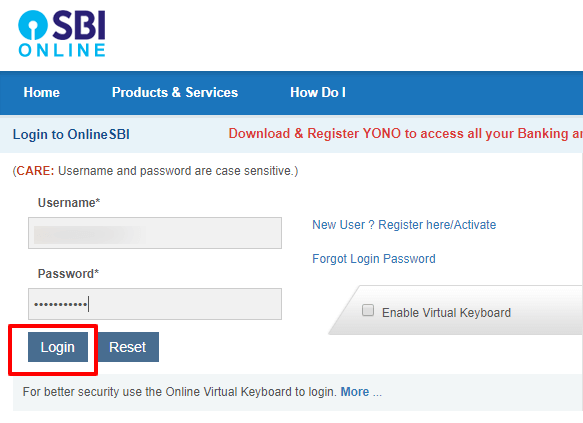
State Bank of India (SBI) is the largest public sector bank in India, offering a wide range of digital banking services through its online platform. The SBI Bank Login facility allows customers to access their accounts anytime, manage transactions, pay bills, and use many other services from the comfort of their home.
This article explains everything you need to know about SBI Bank Login, including features, login steps, benefits, and common issues.
What is SBI Bank Login?
SBI Bank Login is an online banking service provided by the State Bank of India through its official website and mobile application (YONO SBI). It enables customers to securely access their savings account, current account, fixed deposits, loans, and other banking services online.
Customers need a valid username and password to log in to SBI Internet Banking.
Types of SBI Online Banking Login
SBI offers different login portals based on customer needs:
1. SBI Personal Banking Login
Used by individual customers to manage savings and personal accounts.
2. SBI Corporate Banking Login
Designed for businesses and corporate customers to handle bulk transactions and approvals.
3. YONO SBI App Login
A mobile banking app that provides banking and lifestyle services in one place.
How to Login to SBI Internet Banking
Follow these simple steps to access SBI online banking:
- Visit the official SBI Internet Banking website
- Click on Personal Banking
- Select Login and then click Continue to Login
- Enter your Username and Password
- Fill in the captcha code
- Click Login
Once logged in, you can access your account dashboard and use various services.
How to Register for SBI Internet Banking
If you are a new user, you must register before logging in:
- Go to the SBI Internet Banking homepage
- Click on New User Registration / Activate
- Enter your account details and registered mobile number
- Verify using OTP
- Create a username and password
- Complete the registration process
After registration, you can log in using your credentials.
Key Features of SBI Bank Login
- Account balance and statement check
- Fund transfers (NEFT, RTGS, IMPS)
- Bill payments and mobile recharges
- Fixed deposit and recurring deposit services
- Loan account management
- Cheque book request and stop cheque service
- Profile and password management
Benefits of SBI Online Banking
- 24/7 access to banking services
- Saves time and avoids branch visits
- Secure and encrypted transactions
- Easy tracking of expenses and payments
- Available on both desktop and mobile devices
Common SBI Login Problems and Solutions
Forgot Username or Password
Use the Forgot Username/Password option on the login page and follow the instructions to reset it.
Account Locked
After multiple failed login attempts, your account may be locked. You can unlock it online or visit the nearest SBI branch.
OTP Not Received
Check network connectivity and ensure your mobile number is registered with the bank.
Security Tips for SBI Bank Login
- Never share your login credentials with anyone
- Use a strong and unique password
- Avoid using public computers for banking
- Always log out after completing transactions
- Enable SMS and email alerts for account activity
Conclusion
SBI Bank Login makes banking simple, fast, and convenient for millions of customers across India. With its secure online platform and user-friendly interface, SBI Internet Banking allows you to manage your finances efficiently without visiting a bank branch.
FAQs – SBI Bank Login
1. What is SBI Bank Login?
SBI Bank Login is an online banking service that allows customers to access their State Bank of India accounts through the official website or the YONO SBI mobile app. It helps users manage accounts, transfer money, and pay bills securely.
2. How can I log in to SBI Internet Banking?
You can log in by visiting the official SBI Internet Banking website, clicking on Personal Banking, entering your username, password, captcha, and then clicking Login.
3. How do I register for SBI Internet Banking?
To register, click on New User Registration / Activate on the SBI Internet Banking page, enter your account details and registered mobile number, verify with OTP, and create your login credentials.
Also Read: The Rise of Kelly Brook: From Small-Town Girl to International Icon
4. What should I do if I forget my SBI login password?
Click on Forgot Password on the login page. You can reset your password online using your registered mobile number, debit card details, or by visiting the nearest SBI branch.
5. Can I access SBI Bank Login through a mobile app?
Yes, you can use the YONO SBI app to access SBI online banking services. The app is available for both Android and iOS devices.
6. Is SBI Internet Banking safe?
Yes, SBI Internet Banking uses advanced security features such as encryption, OTP verification, and secure login protocols to protect customer information and transactions.
7. What services are available after logging in to SBI?
After logging in, you can check account balance, view statements, transfer funds (NEFT, RTGS, IMPS), pay bills, recharge mobiles, request cheque books, and manage deposits and loans.
8. What should I do if my SBI account gets locked?
If your account is locked due to multiple failed login attempts, you can unlock it online using the Unlock User option or visit your nearest SBI branch for assistance.
9. Why am I not receiving the OTP from SBI?
OTP issues may occur due to network problems, DND settings, or an unregistered mobile number. Ensure your mobile number is linked to your SBI account and has proper network coverage.
10. Can I use SBI Internet Banking outside India?
Yes, SBI Internet Banking can be accessed from anywhere in the world as long as you have a stable internet connection and your registered mobile number for OTP verification.
11. Is there any charge for using SBI Bank Login?
No, SBI does not charge customers for using Internet Banking or logging in through the YONO SBI app.
12. How can I keep my SBI login secure?
Always use a strong password, never share your login details, avoid using public computers, and log out after completing your banking activities.
