
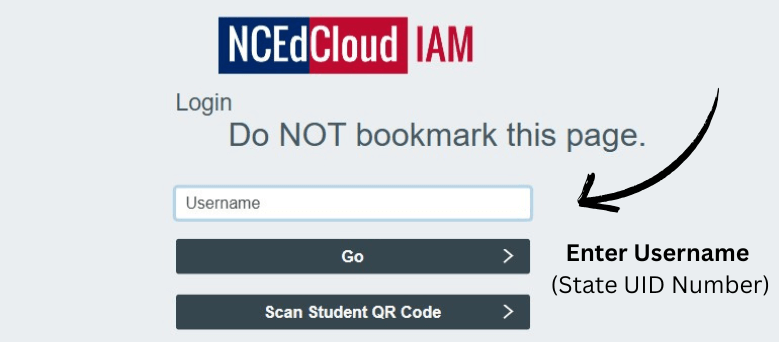
In today’s digital world, schools and educational institutions rely heavily on technology to streamline learning and administrative processes. NCEDCloud Login is one such platform widely used across North Carolina’s public schools. It provides students, teachers, and staff with a single, secure access point to multiple educational applications and resources.
If you’re a student, parent, or educator looking to understand how to log in to NCEDCloud, this guide covers everything you need to know.
What is NCEDCloud?
NCEDCloud, short for North Carolina Education Cloud, is a digital identity management system that enables users to access different educational applications with a single login. It is primarily powered by RapidIdentity, which ensures secure and convenient sign-in.
Through NCEDCloud, users can access:
- PowerSchool (SIS) – for grades, attendance, and schedules
- Canvas – learning management system (LMS) for online classes
- Schoolnet – assessments and instructional tools
- Clever – digital learning apps
- Other school-specific applications
How to Log in to NCEDCloud
Follow these steps to access your NCEDCloud account:
Step 1: Visit the Official NCEDCloud Website
- Go to: https://my.ncedcloud.org
Step 2: Enter Your Username
- Your username is usually your State UID (Unique Identification Number) assigned by the school.
- Students can get their UID number from their teacher or school administrator.
Step 3: Enter Your Password
- Enter the password associated with your account.
- First-time users may need to set up their password and security questions.
Step 4: Click “Go” to Access Your Dashboard
- After logging in, you will see a dashboard with all the applications linked to your NCEDCloud account.
Resetting Your NCEDCloud Password
If you forget your password, here’s how to reset it:
- On the login page, click “Forgot My Password”.
- Enter your UID and answer the security questions.
- Create a new password following the required format.
- Log in again with your updated credentials.
For younger students (K–5), password resets may require teacher or school administrator assistance.
Common Login Issues and Fixes
- Incorrect UID or Password: Double-check your entry and ensure Caps Lock is off.
- Account Locked: Too many failed attempts may lock your account; wait a few minutes or contact school IT support.
- Password Expired: Reset it through the self-service option or ask your teacher for help.
Benefits of NCEDCloud Login
- Single Sign-On (SSO): Access multiple applications with one username and password.
- Security: Keeps student and staff data protected.
- Convenience: Eliminates the need to remember multiple credentials.
- Accessibility: Works across different devices – computers, tablets, and smartphones.
Final Thoughts
The NCEDCloud Login system is a valuable tool for students, teachers, and administrators in North Carolina schools. By providing secure and centralized access to learning applications, it simplifies digital learning and ensures smooth classroom operations.
Also Read: LPPSA Login – Complete Guide
FAQs About NCEDCloud Login
Q1. What is my NCEDCloud username?
Your username is your State UID, which you can get from your teacher or school administrator.
Q2. Can parents log in to NCEDCloud?
No, NCEDCloud accounts are only for students, teachers, and school staff. Parents should access information through PowerSchool Parent Portal.
Q3. What should I do if I forgot my NCEDCloud password?
Use the “Forgot My Password” option on the login page or contact your school’s IT helpdesk.
Q4. Is NCEDCloud safe for students?
Yes, it uses RapidIdentity to ensure secure access to educational resources.
